
myBTG helpdesk app
Business Technology Group (BTG)



Role
User Experience Designer
Timeline
May 2025 - Jul 2026
Tasks
Interaction design
User research
Design & functional specs
Roadmap & backlog prioritisation
Tools
Figma
Figjam
GitLab
Confluence

Business Technology Group (BTG) is a Kiwi-owned IT Managed Services Provider. They have a number of in-house developed software products, of which myBTG is a helpdesk app used to keep track of tickets, record job notes, and enter time.
myBTG is integrated with BTG's ERP and other business-critical tools, enabling the development of tailored features for the business. It also includes other tools like quoting, billing, and reporting.
The project

I led the myBTG redesign project to integrate a new helpdesk system under the hood
A user flow example where a sub-ticket can be created for communicating with a supplier, separate to the conversation with a customer.
The challenge
Mapping and analysing workflows created in Outlook
I interviewed a total of 25+ staff members for this project, starting with people across the Procurement, Finance and Operational Support teams to capture their processes and tasks. While Outlook works well enough for their day-to-day, a lot of workarounds have been implemented to stretch its capabilities to more than just an email client. The research identified opportunities to reduce cognitive load and improve efficiencies with delegating and keeping track of tasks and communications.
Key findings from user interviews with people across the BTG the Procurement, Finance and Operational Support teams.
Workload is managed using Outlook features like categories & folders.
Workarounds are created within Outlook constraints to track ownership, progress, and visibility over each other's tasks.
Accuracy is highly valued to foster strong relationships.
Pride is taken to complete requests with attention to detail, often juggling tasks & conversations with sensitive info.
Daily work spans across multiple other systems.
Including the Quick Quotes quoting tool, spreadsheets, SharePoint file storage, existing myBTG app, and the ERP.

Recreation of example of the Outlook screen for a Procurement team member. They receive requests via a shared mailbox, pick up the task by tagging the email with categories, then file the email in a folder once the task is completed.
We’re always in this mentality of filing everything against the customer. I can go back to the file system and find everything. Otherwise the searching is too much.
Participant B
You got so many duplicated emails, but there's no choice. We always CC everything to the shared mailbox. Otherwise my team won’t know what I’ve sent to the client.
Participant A
Ideation
Translating Outlook workflows into myBTG, using native Jitbit ticketing functionality
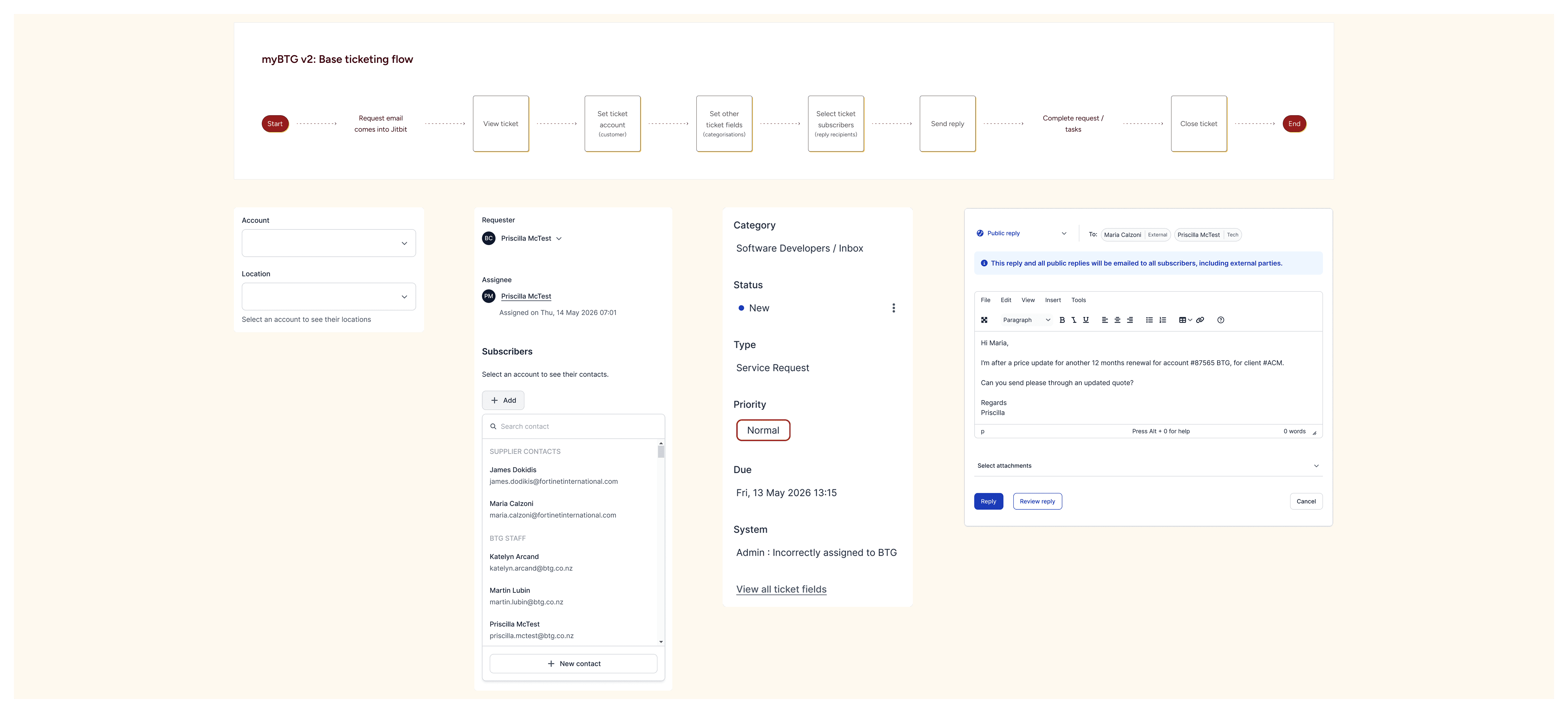
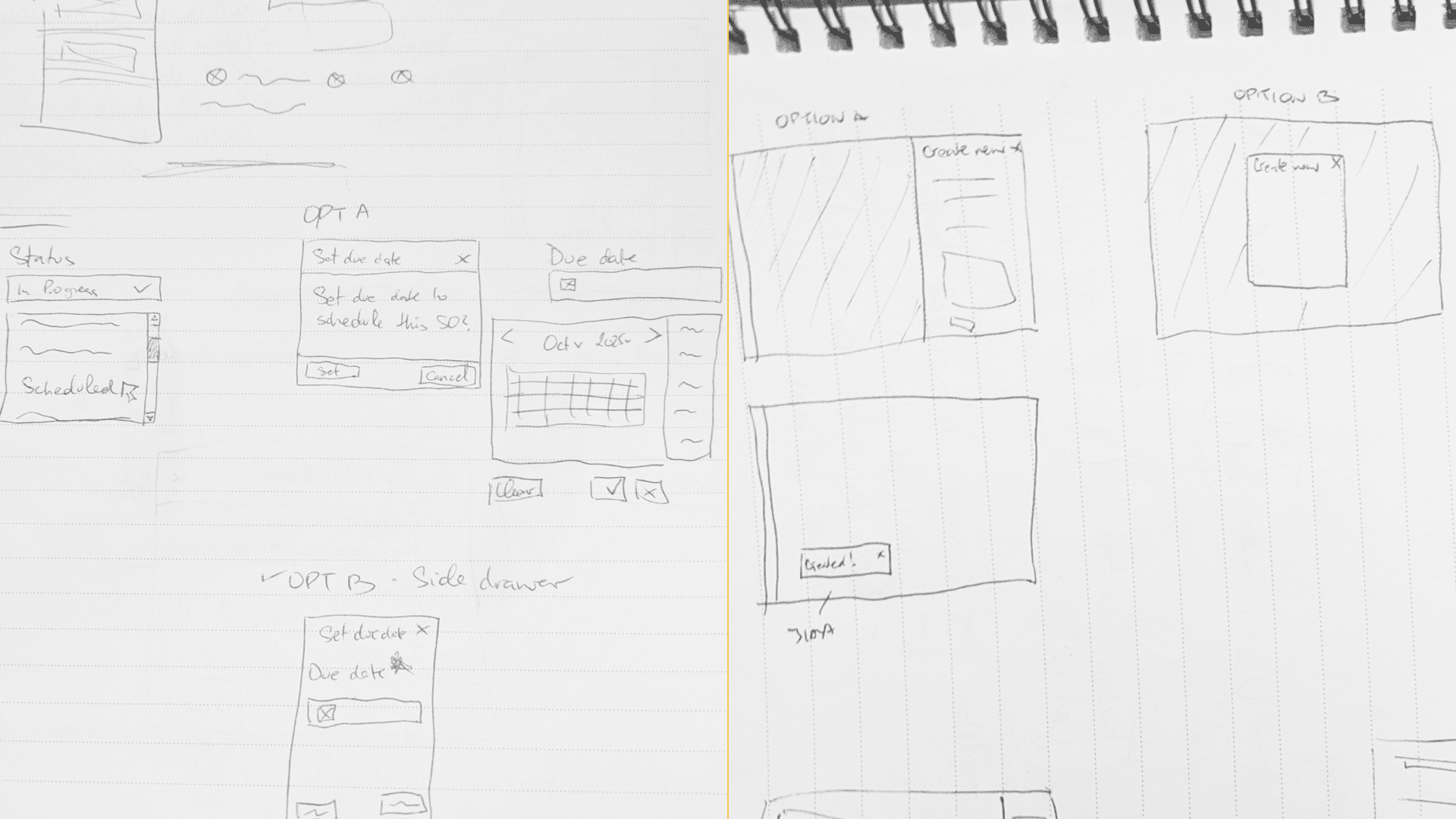
I proposed user flows and kicked off ideas with wireframes and sketches, working closely with engineers to ensure technical plausibility. The goal is to combine the new ticketing functionality with external integrations, to optimise new ways of working in myBTG which can be easily adopted by the operational support teams.


The fun part
Designing a streamlined way to manage tasks and communications
My focus with the design is to ensure myBTG features are easy to learn and use, while ensuring that tickets can easily be seen, delegated, and updated accurately.
I carefully considered UI patterns and interactions to support the Jitbit native ticketing flows, and flows tailored for the operational support teams.

Easily update ticket fields to foster accuracy
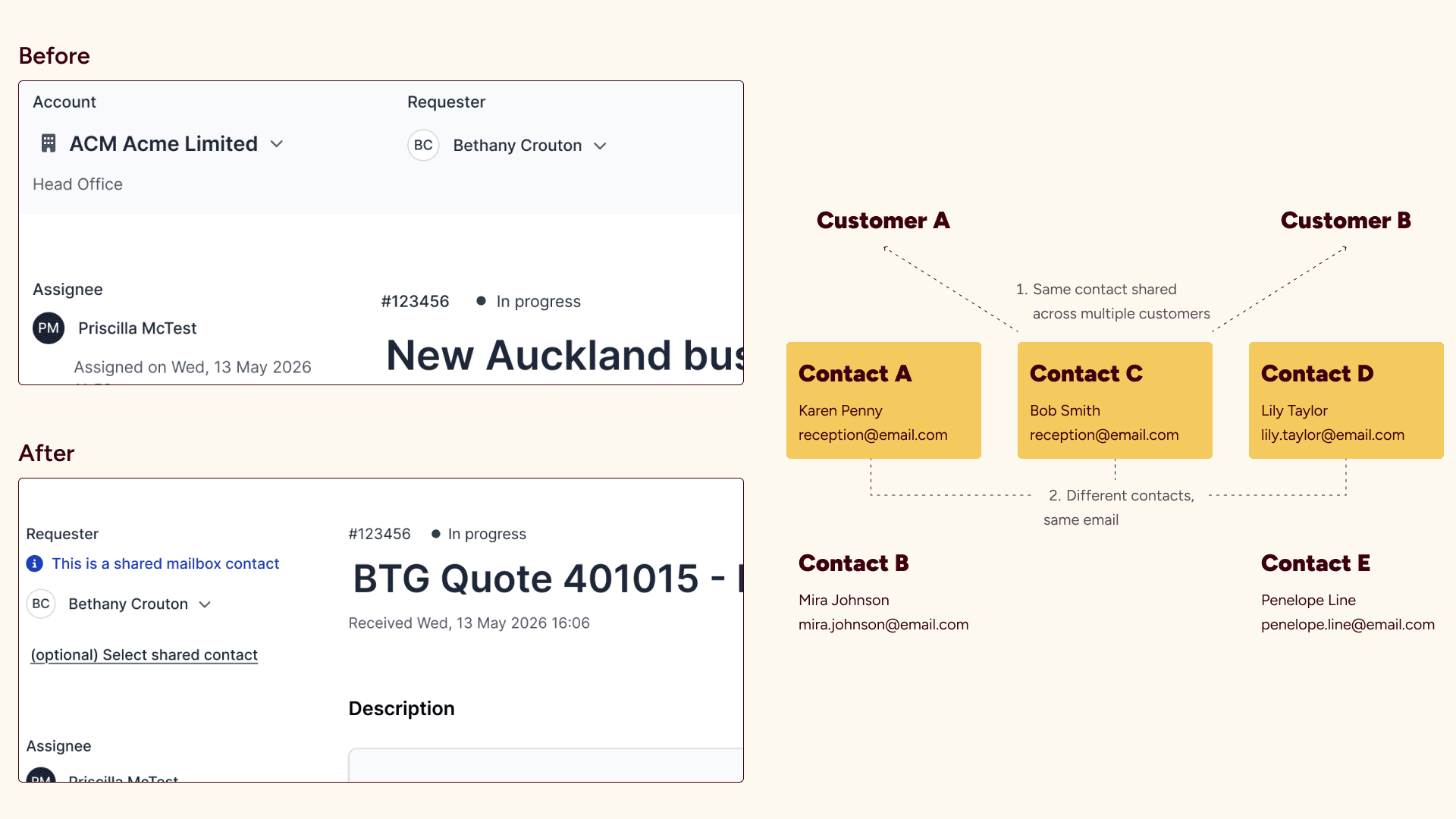
Majority of ticket fields can be updated in-page or with minimal steps to allow people to focus on one field at a time. It also provides flexibility with managing dependencies and validations in the code.
In comparison, the previous way to create or update a ticket or "Service Order" led people to a separate page with a large form, where mandatory and non-mandatory fields mixed in, among other usability issues.

Screenshot of the screen in the old myBTG app to create or update a "Service Order".


Optimising designs for commonly used resolutions based on analytics
The new myBTG designs are optimised for 1920 x 1080 computer monitor and 1280 x 720 laptop screens as per business directive and analytics data, as these are the devices primarily used by BTG staff.
Mobile designs were created to optimise the viewing of ticket details in a separate screen, leaving the key ticket details and replies on the main screen.


On the roadmap
Milestone 2 features from further user research findings
The first project milestone is still in development, but will be followed by QA, UAT, and bug fixes before launch. For the BA side of my role, I wrote acceptance criteria for the scope of work and created a release plan.
I conducted interviews with 20 engineers across 8 teams to prepare for the second milestone to migrate the engineering teams to the new app. This uncovered pain points and feedback on what’s working well with not only the existing myBTG but also business processes.
The research will inform improvements and features to port over from the existing myBTG, including time entries and task checklists.
Key insights from a second round of user interviews with 20 engineers, across 8 teams
BTG engineers show enthusiasm in doing their jobs well.
This is a common observation regardless of the engineer’s experience level or tenure at BTG. They rely on each other and many systems in the BTG ecosystem, including myBTG, in their daily work.
Each person has their own limit for tolerating overhead caused by limitations in myBTG or processes.
While they’re generally proactive with resolving blockers, many engineers end up creating workarounds using other tools to perform their jobs effectively.
Engineers want information to be easily accessible and centralised in myBTG.
The biggest challenge is finding scope and exclusions for customer contracts in order to complete requests and enter time. They acknowledged data is sprawled across multiple systems.
Better incorporation of processes into myBTG is desired in a more consistent and non-contradictory manner.
Like stronger links to customer SLAs and engineer KPIs, as well as developing more tailored features for engineering teams outside of the core helpdesk teams.
It would be better if the SLA is automatic, but have an option to edit it. For example, if it's node down, it should be automatic within two hours. Currently we have to click the option. So many manual things going on.
Participant L
It would be good to have a ticket classification, type, or flag to indicate it is for a security incident. Helps differentiate and capture fields/data specific to security incidents, which are different than operational incidents.
Participant X
I don’t use the Start and End time feature on the time entry form. I make sure I get my hours in at the end of the day. I kind of just chunk it in.
Participant R
It would be nice to have priorities. I can’t tell which tasks to do first. I can’t tell which one is a dependency on another.
Participant G


Reflection
A challenging but rewarding project
After previously being a Product Owner of myBTG for over 5 years and coming back in a UX capacity, it’s been rewarding to see the evolution of the app from initial launch to the progress we made on the new version with a new helpdesk system.
Leading technical requirements like APIs and other integrations from UX requirements that came out of user research has resulted in a change of mindset for senior leadership to reduce reliance on building out of assumptions.
I’m proud of my contribution to it and I hope the new UI will bring value to the people who use the app on a daily basis once it’s launched.

A cool thing I learnt
The Frontend Engineer introduced me to Tanstack query, which allowed me to test the variants of a UI component from the browser. I just have to open the dev tools, type in a command in the console to open the tool, and it'll display the API fields with real data. I can then manipulate the data to review how the component variants look, like its empty state.
Working with Priscilla at BTG was a privilege and such a great experience. Her product mindset and attention to detail really stand out. She consistently thinks about what is best for the product, the end user, and the business, and is great at finding practical solutions that balance these needs from both a UX and technical standpoint.
She is a reliable and trustworthy team player who genuinely cares about doing great work and is always looking for ways to improve and make things better.
Anyone would be lucky to have her on their team!
John Medina
Senior Frontend Engineer
Worked together at BTG